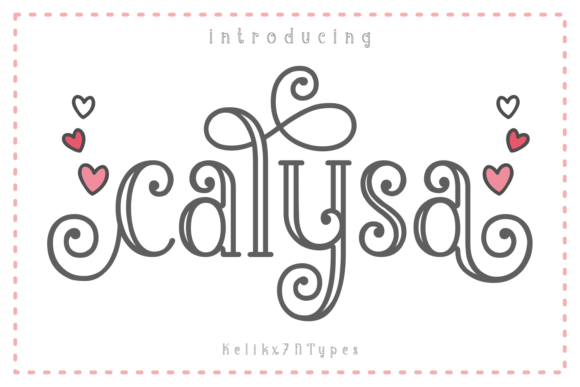
Calysa: A Playful Display Font
As a web designer, I'm always on the lookout for fonts that can elevate a design without overwhelming it. Calysa is one of those rare finds—a display font that brings personality and charm to digital projects while maintaining a level of professionalism. Whether it's used in a hero section or a call-to-action button, Calysa adds a unique touch that feels both modern and nostalgic.
Testing Calysa in a Hero Section
One of the first places I tested Calysa was in a hero section of a boutique online store. The font’s playful curves and slightly uneven baseline give it a handcrafted feel that pairs well with the aesthetic of small businesses. It stood out against a minimalist background, drawing attention without clashing with the overall design. The font’s weight and spacing made it easy to read on both desktop and mobile screens, which is essential for responsive layouts.
I experimented with different sizes and line heights to see how it would perform in various contexts. At 48px, it felt bold enough to command attention but not so large that it dominated the entire screen. When scaled down to 24px for a subheading, it still maintained its visual appeal, making it versatile for different design needs.
Calysa in Call-to-Action Buttons
Another area where Calysa shines is in call-to-action buttons. I used it on a landing page for a digital course, and the result was striking. The font’s unique shape added a sense of creativity that aligned with the course’s theme. It contrasted well with a solid color background, making the button stand out without needing additional styling.
However, I noticed that when placed over an image banner, the font’s detail could be lost if the background was too busy. To counter this, I adjusted the text color and added a subtle drop shadow, which helped it pop without feeling forced. This shows that while Calysa is visually appealing, it may require some tweaking to work effectively in more complex designs.
Font Pairing and Web Design Considerations
When using a decorative display font like Calysa, pairing it with a clean sans serif font often yields the best results. I paired it with a simple, modern sans serif for body copy, and the contrast was pleasing. The combination created a clear visual hierarchy, allowing the headline to grab attention while keeping the rest of the content readable.
For a more editorial look, I tried pairing Calysa with a serif font. The result was elegant and sophisticated, perfect for a blog or portfolio site. However, I found that the two fonts worked best when used in separate sections rather than together in the same layout, as they could clash if not balanced carefully.
It’s also important to consider accessibility when using a decorative font. Calysa may not be the best choice for small text or navigation menus, as its intricate details can reduce readability. For these elements, a simpler font is usually more effective.
Responsive Design and Mobile Performance
On mobile devices, Calysa performed well, especially when used in larger sizes. I tested it on a product landing page and found that it looked great on both portrait and landscape orientations. The font’s spacing allowed it to scale smoothly without becoming cramped or distorted.
However, I noticed that on very small screens, the font’s curves could become less distinct, making it harder to read. To address this, I reduced the font size slightly and increased the line height, which improved legibility without sacrificing the font’s character.
Using Calysa in Digital Branding
Calysa has potential beyond just headlines and buttons—it can be a key element in a brand’s identity. I used it in a digital brand kit for a creative studio, and it added a personal, artisanal feel to the design. It worked well in logos, social media graphics, and email templates, helping to create a cohesive visual language across platforms.
One thing to keep in mind is that Calysa is best suited for short phrases and titles. Long paragraphs in this font can be difficult to read, especially on smaller screens. For longer text, a more traditional font is usually a better choice.
Before using Calysa in any project, I recommend checking the available styles, weights, and file formats. Ensuring that the font is properly licensed for commercial use is also crucial, especially if it will be part of a client’s website or a digital product sold online.
Final Thoughts on Calysa
Overall, Calysa is a versatile and charming display font that can add a unique touch to digital projects. Its playful yet professional appearance makes it ideal for websites that want to stand out while maintaining a sense of elegance. Whether used in a hero section, a call-to-action button, or a brand identity, Calysa has the potential to enhance a design in meaningful ways.
For web designers and digital creators looking for a font that balances creativity with usability, Calysa is definitely worth considering. Just remember to use it strategically and pair it with complementary fonts to ensure the best possible outcome.